
Today, more than 5.42 billion people are spending over 2 hours daily scrolling through social media for content that resonates with them. So, social media has now turned into the ultimate platform for brands to gain visibility and attention.
But here’s the kicker, managing your social media channels and maintaining consistency is like trying to block multiple leaks. That’s where social media automation tools come in, it turns that chaos into an orchestrated success.
Buffer has long been the go-to scheduling champ but it isn’t meant for all, as it is pricey and sometimes fails to post. If you’re someone who’s looking for social media management tools to fill the gaps then these 5 Buffer alternatives are sure to come in handy.
Are you ready to discover these social media game changers? Let’s dive in!
Why Consider Buffer Alternatives?
We get it, Buffer has been the trusted tool for many social media managers. Many businesses find that alternatives to Buffer have better features, are more value for money and functionality. But, the social media landscape has evolved into a stage where it even analyses pause duration, scroll patterns, comments and more to deliver a more personalised experience. This is where Buffer app alternatives come in to provide you with modern social media management capabilities like advanced AI, cross-platform strategies, better analytics and slicker interfaces. These platforms are ideal for growing businesses and agencies that want cost effective and scalable solutions.
7 Best Buffer Alternatives for All Business Types
1) GudSho Social
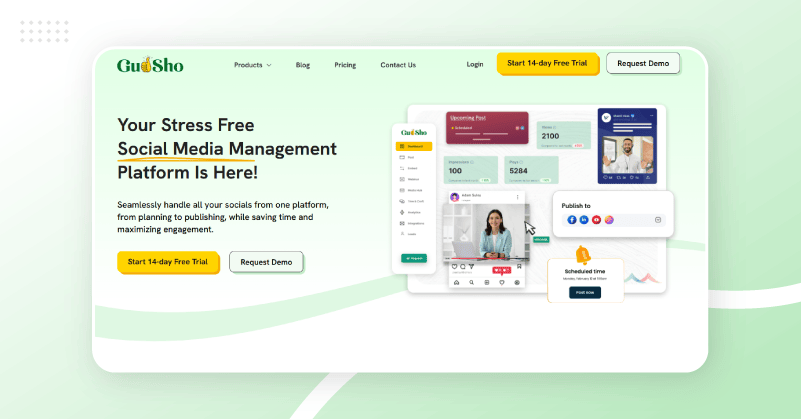
GudSho Social is one of the best buffer alternatives that specializes in video-centric social media management. The platform lets you upload, edit, optimize and distribute content across Facebook, Instagram, LinkedIn and YouTube from a single dashboard. With GudSho Social’s smart scheduling, you can plan up to 30 days of posts in just five minutes and publish on platforms at set times.
What makes GudSho Social unique is its organized content calendar, real-time engagement for managing mentions and comments. Unlike other scheduling platforms, the advanced analytics and branding options make it perfect for businesses that are focusing on video marketing website.
Key Features
- Multi-Platform Publishing: From a single dashboard you can create and publish content on Facebook, Instagram, LinkedIn and YouTube without formatting friction.
- Unified Social Inbox: You can reply to mentions, comments and reactions from all connected social platforms in real time.
- Cross-Platform Analytics Dashboard: Get consolidated performance reports on views, likes, comments and shares for all your posts and platforms.
- Built-In Video Editor: You can cut, crop, split, merge and turn long videos into short clips and vice versa directly from the platform with no technical skills required.
- Content Calendar: A visual calendar shows all your posts and helps identify spot scheduling gaps and errors before anything goes live.
Pros
- Create and publish content to Facebook, Instagram, LinkedIn and YouTube.
- Advanced scheduling capabilities lets you plan up to 30 days of posts in minutes.
- Easily reply and react to mentions, comments and reactions across various social platforms.
- Get consolidated performance reports on views, likes, comments & shares of all your posts.
- The built-in video editor lets you create videos with zero technical expertise.
Cons
- Features for advanced editing are limited compared to dedicated video editing software.
- Video-focused approach not ideal for typically use static formats.
- Some areas may require minor improvements.
Price
- GudSho Social offers a 14-day free trial with no strings attached and no credit card details required.
- The custom pricing is based on your needs and you can contact customer support for details.
2) SocialPilot
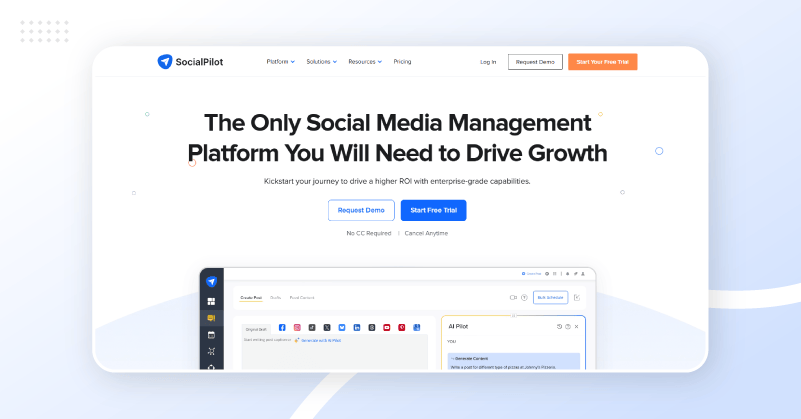
SocialPilot is one of the top apps similar to Buffer that focuses on social media for agencies. For businesses, agencies and professionals SocialPilot offers powerful publishing and collaboration features that Buffer cannot match.
The platform is great for bulk scheduling, social inbox management and white-label solutions for agencies with multiple client accounts. SocialPilot is popular for larger teams that want pro functionality without the enterprise price tag.
Key Features
- Bulk Scheduling and CSV Upload: Schedule hundreds of posts across many accounts at once – greatly reducing the time cost of high-volume content operations.
- White-Label Solutions: Get a full white-label agency dashboard so you can show the platform under your own brand to clients something Buffer does not provide.
- Social Inbox Management: Receive all incoming messages, comments and mentions from all connected accounts in one inbox.
- Client Collaboration Tools: Features for client management include approval workflows, role-based permissions and client-specific account access.
- Multi-Platform Publishing: Schedule and publish on Facebook, Instagram, LinkedIn, Twitter, X, TikTok, Pinterest and Google Business Profile effortlessly.
Pros
- Full social media management features including publishing, analytics and collaboration tools.
- White-label solutions for agencies & consultants with many clients’ accounts.
- Efficient content management using bulk scheduling & CSV upload.
- Social inbox to manage all your incoming messages on one dashboard.
- Multiple paid plan options at affordable pricing.
Cons
- Limited advanced analytics compared to competitors.
- The lower-tier plans don’t provide key features that agencies typically want.
- Occasional errors occur during platform integration.
Price
- Free 14-day free trial.
- $20/month for standard plan.
- $60/month for premium plan.
- Custom plan for enterprises.
When billed annually it saves you around 15% across all plans making it one of the cheaper Buffer alternatives.
3) Agorapulse

Agorapulse is known to be the premium Buffer alternative that is all about engagement & community management. This is a social listening with integrated inbox management which works across multiple social networks and beats Buffer at its most basic features.
The robust reporting and team collaboration features on it makes it ideal for businesses that care about customer engagement and analytics. Not only that, the platform combines powerful scheduling features, social monitoring and response management to transform your social media channels into an efficient customer service hub.
Key Features
- Unified Social Inbox: All comments, DMs, mentions and reviews from every connected platform can be managed in one inbox where all interactions are acted on, assigned or dismissed.
- Social Listening & Brand Monitoring: Advanced social listening tool tracks brand mentions, competitor conversations and industry keywords outside of direct interactions.
- 360-Degree Analytics and White Label Reporting: Premium reporting and white-label export for client-facing presentations and agency monthly reviews.
- Team Collaboration & Approval Workflows: Workflows for multistage approvals, internal notes, team assignments and role-based permissions for scalable agency operations.
- Ad Comment Management: Monitor and manage comments on active Facebook and Instagram ad campaigns from the same inbox as organic content.
Pros
- A single unified social inbox to manage all your interactions.
- Advanced social listening & monitoring for brand awareness.
- 360-degree analytics and white label reporting provides professional presentations.
- Great team collaboration tools with approval workflows and task management to streamline your process.
- Great customer support & dedicated account management for quick resolutions.
Cons
- High pricing compared to many competitors.
- UI can be confusing when managing large content workflows.
- Limited integration support compared to other platforms.
Price
- Free Plan manages up to 3 social profiles.
- Standard plan $79/user/month.
- Professional plan $119/user/month.
- Advanced plan $149/user/month.
- Custom plan for larger teams and enterprises based on needs.
4) Hootsuite

Among the most familiar names in social media management platform, Hootsuite is the another best Buffer alternative for large businesses and enterprises. It supports many social networks and third-party applications that smaller tools cannot handle.
Hootsuite is big on enterprise-level features like advanced team management, custom reporting and social listening. But it is now much more expensive and targeted at larger organizations with bigger budgets and complex needs.
Key Features
- Supports 20+ Channels: You can manage posts across Facebook, Instagram, LinkedIn, TikTok, YouTube, Twitter, X, Pinterest, Snapchat and Bluesky from one dashboard. This is more platforms than any other tool on this list.
- OwlyWriter AI: AI helps to generate captions, post ideas and hashtags instantly, which shortens production time without compromising brand voice.
- Social Listening Across 150M+ Sources: You can track brand mentions, competitor activity and industry conversations across 150 million sources in 187 languages.
- Advanced Analytics and Custom Reporting: Get comprehensive performance reports for all organic and paid campaigns, including audience demographics, competitive benchmarking and ROI tracking.
- Enterprise Team Collaboration: Get role-based permissions, task assignments, multi-level approvals, and organizational team structures to manage complex operations efficiently.
Pros
- Wider range of platform integrations & enterprise-grade features for complex workflows.
- Advanced analytics and custom reporting with competitive benchmarking.
- Strong team collaboration tools with role-based permissions & organizational structures.
- OwlyWriter offers AI-powered content creation for enhanced productivity.
- Full range of social listening and monitoring tools for brand management.
Cons
- Prices are much higher now and less accessible than before.
- Complex interface that can be overwhelming for smaller teams and beginners.
- Features in lower-tier plans are limited so users must upgrade.
Price
- 30-day free trial.
- $30/month for the Standard Plan.
- $120/month annually for the Advanced plan.
- Custom price for Enterprise Plan.
5) ContentStudio
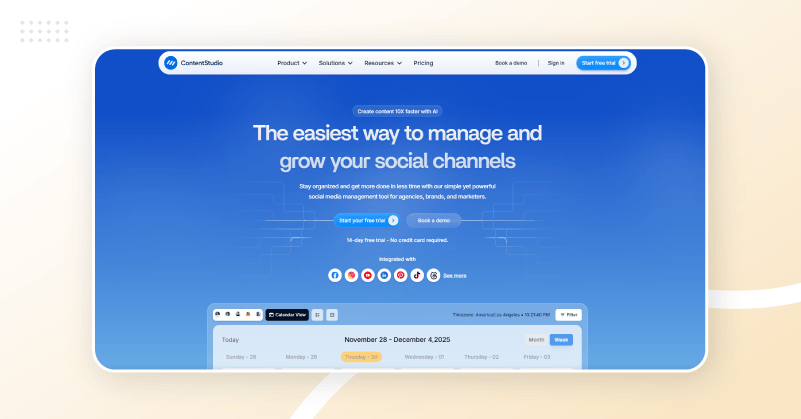
ContentStudio is one of the cheaper data-driven Buffer alternatives that combines content discovery with social media management in one place. It does a great job curating content by finding trending topics and stuff to share with your audience. This gives you the answer to your age-old question of “what should I post today?”.
ContentStudio’s strength is that you can manage social media and blog publishing from one dashboard. It is great for content-heavy marketing across multiple channels. Automation features like RSS feeds and evergreen campaign management keep your content flowing even when you aren’t managing it.
Key Features
- Content Discovery and Curation Engine: Curation Engine finds trending topics, industry news and high-engagement content from around the web that matches your audience and eliminates the blank content calendar problem permanently.
- Blog Publishing Integration: Post directly to WordPress, Medium and other blogging platforms from the same social scheduling dashboard with no separate editorial tools needed.
- AI-Powered Content Generation: For every connected platform, AI tool helps generate post captions, content ideas and optimization recommendations.
- RSS Feed Automation: Automatically pull content from RSS feeds to publish or share it on your social channels to keep your feeds active without manual daily input.
- Evergreen Campaign Management: Recycle top-performing content at your set intervals to extend life and maintain consistency without having to manually republish it.
Pros
- Great content discovery & curation features to create new post ideas.
- Built-in blog publishing for WordPress, Medium & other platforms.
- AI-powered content generation & optimization tools enhance engagement.
- Complete automation with RSS feeds and evergreen campaigns.
- Innovative content calendar to manage your scheduling with ease.
Cons
- Instagram publishing needs more steps + mobile app usage.
- Minor technical issues with platform integrations.
- Interface can be improved.
Price
- 14-day free trial – No credit card required.
- Standard plan at $19/month for 5 social accounts.
- Advanced plan at $49/month for 10 social accounts.
- Agency plans start at $99/month for 25 social accounts. Want more pay more.
6. SocialBu
SocialBu is probably one of the least hyped Buffer alternatives out there for small businesses, solo creators and lean marketing teams that need real automation without the budget. It fills the need many teams have for content recycling, automation rules and RSS-driven publishing without having to shell out enterprise prices for those features.
Also, it combines evergreen content recycling, queue-based scheduling, and automation workflows that keep social channels live without any daily manual intervention. SocialBu automates consistency for small businesses that cannot hire a full-time team member to handle social media management.
Key Features
- Queue-based Scheduling: For each social profile you can set posting times for the and let SocialBu pull the next post from the queue and publish it without making daily scheduling decisions.
- Evergreen Content Recycling: Top-performing posts are automatically recycled and re-queued at defined intervals so your best content can live on without being republished manually.
- RSS Feed Automation: Connect RSS feeds from your blog or industry sources to create and schedule social posts from new content with no manual input required.
- Automation Rules and Triggers: You can create custom automation rules that automatically repost content when it reaches a certain engagement threshold.
- Multi-Account Management: Manage many social accounts including Facebook, Instagram, LinkedIn, Twitter and more from one clean dashboard with clear per-account organization.
Pros
- An affordable entry point for anyone that is similar to Buffer.
- Beginner-friendly interface for faster productivity.
- Evergreen content recycling helps reduce daily manual effort.
- RSS-driven posting and queue management keeps channels active.
- Faster onboarding and issue resolution form customer support.
Cons
- Not suitable for teams that need cross-platform campaign-level reporting
- Advanced automation features may require a learning curve
- Limited platform integration compared to other tools
Price
- Free plan with 3 social accounts and 10 lifetime posts
- Standard plan at $16/month with 12 social accounts
- Super plan at $49/month with 30 social accounts
- Supreme plan at $166/month with 150 social accounts
- Custom plan for agencies
7. Publer
Publer has quietly become one of the best Buffer alternatives for teams that need AI-powered content creation, deep scheduling flexibility and visual content management without the enterprise pricing. It provides post scheduling, AI writing, visual media management and link-in-bio functionality in one place at a price lower than Buffer.
What really makes it unique is its scheduling flexibility. Also, the bulk scheduling, auto-scheduling, recycling queues and calendar views let teams manage their publishing rhythm efficiently. Moreover, the AI writing assistant creates platform-specific captions, content ideas and hashtag recommendations making it one of the most complete Buffer alternative software for teams needing creation support as well as scheduling infrastructure.
Key Features
- AI Writing Assistant: It lets you create platform-specific captions, post ideas and hashtag suggestions for your topic, audience and brand tone to bypass content creation bottlenecks with no external AI tools.
- Bulk Scheduling & Auto-Schedule: Schedule hundreds of posts in bulk or let Publer auto-schedule posts at optimal times based on your audience activity.
- Media Library & Canva Integration: Store and edit visual assets in the Media Library with native Canva integration for design work with no more switching between platforms for visual content creation.
- Content Recycling Queues: Set recycling queues per social profile so it can automatically publish top-performing posts at set intervals without any human intervention.
- Link in the Bio: Built-in landing page builder helps create micro webpages to drive traffic to your Instagram and TikTok profiles without buying a separate tool.
Pros
- Teams that need creation support alongside publishing infrastructure.
- Drag-and-drop scheduling and a visual content calendar to manage posts.
- Built-in watermarking for videos adds creative and planning value without extra tools.
- Native Canva integration and in-platform media library makes content creation easy.
- One of the cheaper Buffer alternatives with AI creation and scheduling depth.
Cons
- Lacks smooth mobile experience.
- Limited team collaboration features.
- Lacks advanced reporting compared to others.
Price
- Free plan with 1 user and 3 social accounts
- Professional plan with unlimited posts at $4/month
- Business plan with team features at $8/month
- Enterprise plan at custom pricing
Wrapping it up
The right Buffer alternatives depend on your requirements, budget & business goals. What matters is finding features that grow with your social media strategy.
Each platform we listed has its own advantages such as GUDSHO for video marketing capabilities, SocialPilot and Agorapulse for agency tools, Hootsuite for enterprise features or ContentStudio for content-centric approaches.
Use free trials and demos of all these Buffer alternatives to make sure they fit your workflow and goals. The right tool is what makes all the difference in your social media success!